

Text first
Headings, lists, quotations, tables and messages: the template styles running text without a single class to write.
Simple to pick up, complete in use: content blocks, article layouts, layout presets, accessibility held to, and cookie consent built in.
Everything on this page was put in place with one click by the start-up module, and the "Reset everything" button takes it away.
Headings, lists, quotations, tables and messages: the template styles running text without a single class to write.
Ready-made blocks the editor drops in with two clicks, from the hero to the accordion, and which stay editable by hand.
Each category can have its own article layout, built from rows and bricks, without a line of code.
Four tools in the template, each one replacing an extension you will not have to install, nor update, nor replace the day it stops.
Headings, lists, quotations, tables and messages, styled without a single class to write.
No CSS left to write
Fifty-five ready-made blocks, dropped in from the editor and editable by hand.
No page builder needed
One layout per category, built from rows and bricks, without a line of code.
No CCK needed
Four site structures, from the blog to the landing page, in a single choice.
Nothing left to rebuild by hand
Contrast held, reading order stable, everything reachable by keyboard. Colour is never the only cue, and nothing useful is hidden by the stylesheet.
Positions, thumbnail classes, blog keywords: Joomla's own vocabulary is kept as it is, so there is nothing to relearn.
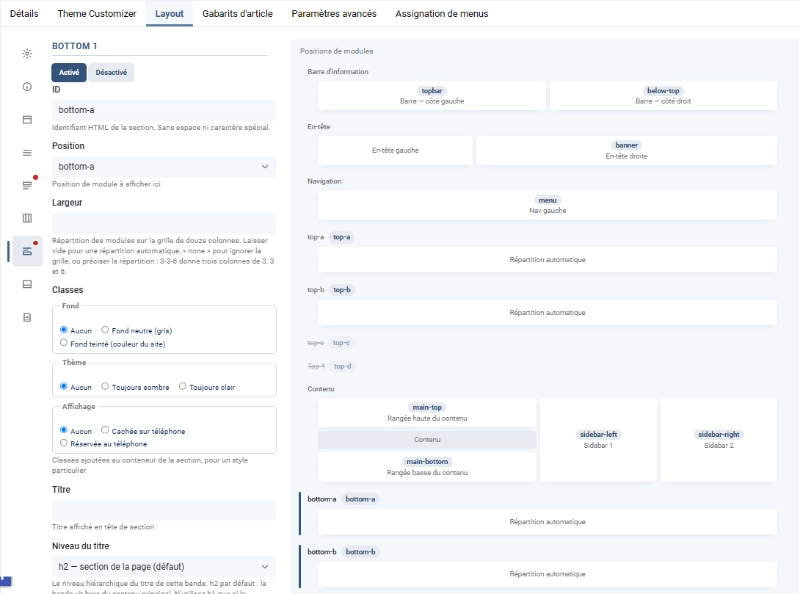
Layout, article layouts and rows are set in the template style. One preset changes a whole site structure at once.
This demonstration installs and removes itself with one click. Your earlier settings are noted, and they are given back to you.
Cette page montre comment Corpus habille le texte courant. Rien n'y est décoré à la main : chaque exemple est écrit avec les balises ordinaires de l'éditeur, et c'est le template qui décide de l'allure.
Un tampon est un bloc tout prêt qu'on insère dans un article depuis l'éditeur, par le bouton « Modèles de contenu ». Corpus en livre cinquante-cinq. En voici quelques-uns, montés à la suite comme ils le seraient dans une vraie page.
No years in business, no millions of downloads to show. Checks, and they run at every release.
55 Content blocks shipped with the template
19 Bricks to compose an article layout
4 Languages, and as many layout presets
What is underneath, and what is not.
The Bootstrap that ships with Joomla, not an embedded copy: one version on the site, the one Joomla updates. Its JavaScript loads only when an extension asks for it. The rest is an in-house stylesheet, written in Sass and compiled into a single file.
A single value drives every colour: a hue angle. The template derives the whole palette from it, light and dark, contrast included. Layout is flex and CSS grid, with no JavaScript framework. Positions and classes are Cassiopeia's: nothing to relearn.
One script computes contrast across all 360 possible hues and refuses the release if a threshold drops. Another compares the stylesheet before and after each rework, selector by selector; it has already caught two properties that had moved silently. Accessibility criteria are quoted in the code, where they apply.
Corpus embeds no third-party library, no page builder, no font or image loaded from another server. What is not there cannot become a way in, and does not have to be patched in a hurry.
Corpus comes from fifteen years of building Joomla sites, not from a development degree. What artificial intelligence brought is not speed: it is what made the discipline above sustainable. Measure before claiming, and write in the code why each fix exists.
Yes. The "Reset everything" button removes the articles, categories, menus and modules the start-up module created, and gives your earlier settings back. Nothing else is touched.
No. Everything on this page is set in the Joomla administration: the template style, the settings of a menu item, and the "Module Class" field.
The principle of Corpus is that what works under Cassiopeia works under Corpus: same positions, same class vocabulary. An existing site therefore lands on familiar ground.
Nothing happens to it. The module only writes its own articles, categories and modules, all marked. It moves one single thing, your home page, and it notes it in order to give it back.
You have to reset in between. The module refuses a second install on top of the first, so as not to leave two sets of articles impossible to tell apart afterwards.
In the template style, under "Article layouts": you build rows and bricks there, then assign the layout to a category. The "Kitchen garden" category shows the opposite, Joomla's own layout.
With a preset, under the "Layout" tab. This page applies one, `landing`, which switches the page body off and shows nothing but rows of modules. The blog and the magazine use others.
It is the starting point, not a finishing option. Contrast held, reading order stable, everything reachable by keyboard, and nothing useful hidden by the stylesheet. Colour is never the only cue.
They come from Pexels and serve as illustration. For a real site, replace them: they are demonstration photographs, not your own material.
The content installs on any template. What needs Corpus is the article layout, the layout presets and the row classes: without it, the demonstration installs but without its styling.
The same articles exist as a blog and as a magazine. Install one, then the other: the content does not change, only the layout does.